
Managing and Using Deployments
Once you’ve created a deployment, you can access detailed information, endpoints, and integration examples to connect your agent with external systems.
Viewing Deployment Details
Click on any deployment in your deployments list to view complete configuration and integration options.
1. Endpoints
Your deployment provides multiple endpoints for different integration methods:
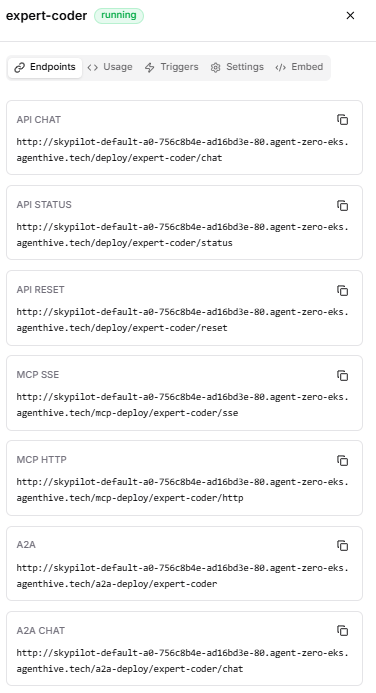
Fig 5.6
1. API CHAT
/deploy/analyst-5208b634/chat
Purpose: Primary user → agent interaction endpoint.
What it does:
- Accepts chat or task requests
- Triggers the agent’s reasoning, tool usage, and response generation
- Returns the agent’s final response
2. API STATUS
/deploy/analyst-5208b634/status
Purpose: Agent health and metadata inspection endpoint.
What it does:
- Confirms whether the agent is running
- Shows enabled capabilities (API, MCP, A2A)
- Exposes runtime metrics like request count
3. API RESET
/deploy/analyst-5208b634/reset
Purpose: Resets the agent’s runtime state.
What it does:
- Clears conversation memory
- Resets internal context or task state
- Does not redeploy or stop the agent
4. MCP SSE
/mcp-deploy/analyst-5208b634/sse
Purpose: Real-time streaming events channel via Server-Sent Events (SSE).
What it does:
- Streams intermediate reasoning steps
- Emits tool calls, state changes, progress updates
- Push-based (server → client)
5. MCP HTTP
/mcp-deploy/analyst-5208b634/http
Purpose: Synchronous control-plane interface for the agent.
What it does:
- Executes structured commands
- Invokes tools or workflows programmatically
- Integrates with orchestration layers
6. A2A
/a2a-deploy/analyst-5208b634
Purpose: Agent-to-Agent communication base endpoint.
What it does:
- Allows other agents to discover and invoke this agent
- Supports multi-agent collaboration
- Enables delegation and task routing
7. A2A CHAT
/a2a-deploy/analyst-5208b634/chat
Purpose: Chat-style agent → agent interaction endpoint.
What it does:
- Accepts messages from other agents
- Preserves agentic protocol (roles, intents, context)
- Returns structured responses for downstream agents
2. Usage
API Access & Integration
Authenticate all requests using your API key in the request headers, interact with the deployed agent via REST APIs (for example, using curl), and configure external MCP clients using the provided MCP configuration to enable secure and seamless connectivity.
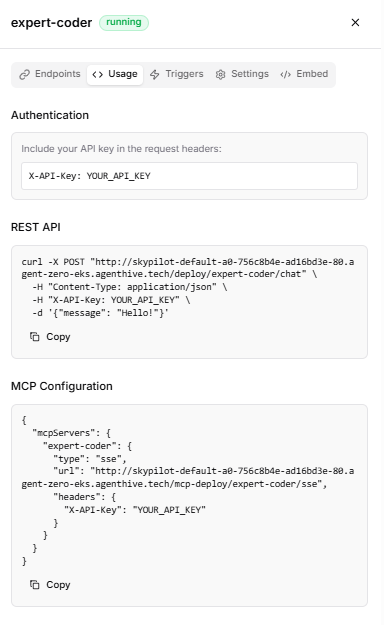
Fig 5.7
3. Triggers:
Configure Composio triggers to receive real-time events from connected services. Active Triggers View and manage triggers that are currently active for this deployment.
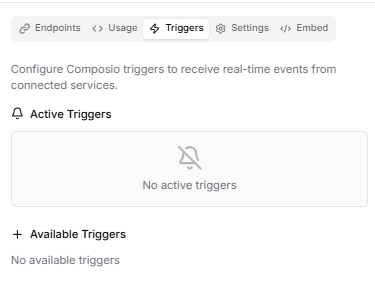
Fig 5.8
4.Settings
Protocols View which integration protocols are enabled for this deployment:
REST API: Enabled HTTP-based API access for traditional integrations
MCP : Enabled Model Context Protocol for tool and service connections
A2A: Enabled Agent-to-Agent protocol for distributed workflows
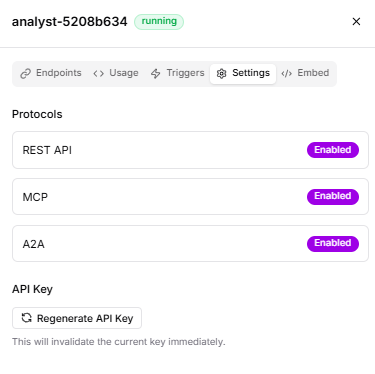
Fig 5.9
5.Embed Code
Embed a chat widget on your website to let users interact with this deployment directly.
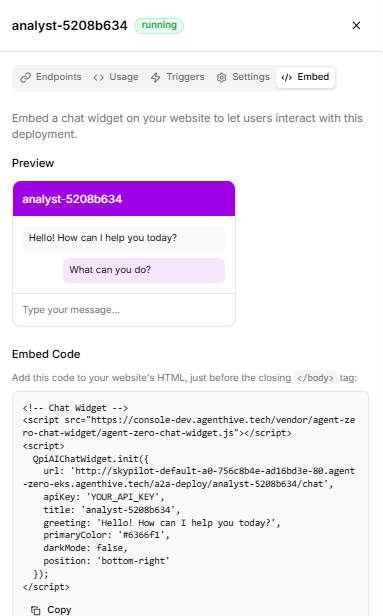
Fig 5.10