
Payment Process
Step 1: Select Your Plan
Click on the “Select now ” or “Subscribe” button for your chosen plan (Monthly or Annual).
Step 2: Razorpay Checkout
You will be redirected to Razorpay, a secure payment gateway, to complete your subscription.
Step 3: Enter Payment Details
Provide the following information:
-
Mobile number
-
Email address
-
Payment method (Credit/Debit Card, UPI, Net Banking, or Wallet)
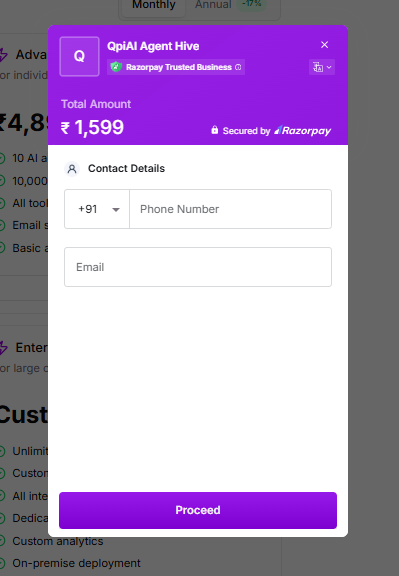
Fig 10.15
Step 4: Complete Payment
Review your order details and complete the payment securely through Razorpay.
Step 5: Confirmation
Once payment is successful, your subscription will be activated immediately, and you’ll receive a confirmation email with your invoice.
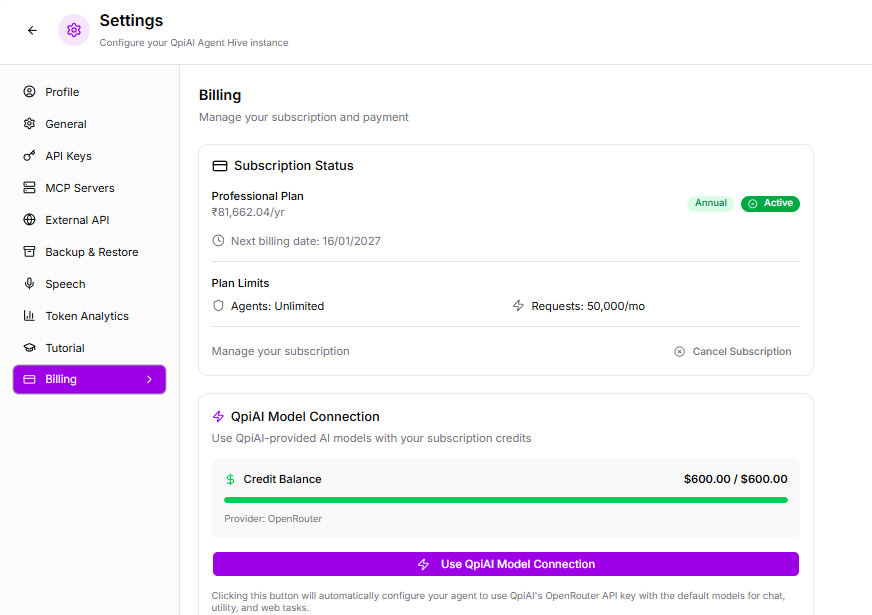
You can view your plan details and available credit balance in the billing dashboard.
Last updated on